
System i Software

Capture

What is Capture?

Capture is a screen tracking solution that allows you to automatically capture and save user activity as displayed on System i (AS/400) workstation screens. Capture works silently and invisibly in the background without adversely affecting system performance. Users may not even be aware that it is working. Its invaluable traceability capabilities allow organizations to conform with the strict regulations that apply to industries such as banking, insurance, health care, and defense. Capture works as both a stand-alone product and as a fully integrated module in Raz-Lee’s iSecurity.

The Capture Solution

In today’s increasingly complex business environment, an effective audit trail is a key component of any organizational IT security program. Regulations require many organizations to maintain detailed transaction activity records and to retain these records for an extended period.

Additionally, IT departments and technical support personnel need to monitor user activity in order to troubleshoot error conditions, track performance bottlenecks, and ensure compliance with organizational policies. This often requires detailed knowledge of not only what users are doing, but also, how they are doing it. Computer logs and audit reports, more often than not, do not provide enough forensic evidence for these purposes.

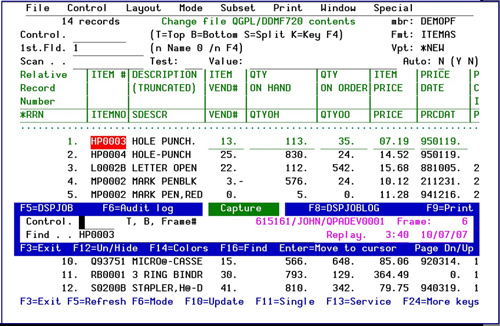
Capture solves that problem. This unique solution complements journals and reports with a visual audit trail of user activity. Capture shows exactly what users are doing and when they are doing it! Captured screens are retrievable by means of an intuitive process featuring flexible scrolling and a powerful free-text search engine. Screen captures occur only when needed. You can retrieve captured screens by means of an intuitive process and easy-to-use tools for locating the captured data screens and logs. Screens are arranged according to individual capture ‘sessions’. Within each session, you can scroll through the screens sequentially or you can use the moveable Capture Menu to move directly to a particular screen or search for screens containing a specific text string.

The Capture Menu also provides commands for displaying the job log and the Audit log entries related to that particular screen and capture session. You can even access the DSPJOB command and print the screen directly from the Capture Menu.


Clear, easy navigation through hierarchy-based levels provide for quick, streamlined usage

Features

  • Provides three solutions in one product - a powerful auditing solution, a regulation compliance solution, and a help-desk troubleshooting solution
  • Captures and retains user activity on System i workstation screens according to predefined criteria
  • such as IP address, user profile, job, day and time
  • Enables compliance with Sarbanes-Oxley, HIPAA, and the California Privacy Act
  • Facilitates retrieval of captured screens with an easy-to-use process and free text search capability
  • Preserves job logs and CL Command logs for subsequent review, even after a session is finished
  • Uses a simple rule definition process suitable for both IT professionals and non-technical users
  • Archives captured screens offline to meet data retention requirements without consuming excessive disk resources
  • Easy navigation through captured sessions via moveable Capture Menu


Simple yet powerful rules creation

Benefits

  • Works as a stand-alone product yet fully integrates with other iSecurity modules
  • Provides invaluable tracking capabilities
  • Automatically triggers screen capturing according to a variety of pre-defined rules
  • Provides an invaluable troubleshooting aid for help desks and technical support departments
  • Saves hours of tedious work and costly phone calls in the event of a problem
  • Captured information is retrievable via a user-friendly display
  • User has complete flexibility to scroll through the screens and job logs using a powerful text search capability